About
ConfigServer Security & Firewall (CSF) is a stateful packet inspection (SPI) firewall, login and intrusion detection, and security application for Linux servers.
CSF is a third-party project that provides a Webmin module. It is not developed by Webmin and is not included in the default Webmin installation.
Project status
Way to the Web Ltd, the original developer of CSF, ceased operations on August 31, 2025. A copy of the original closure announcement is preserved in an unmaintained source snapshot. Before closing, the developer released CSF 15.00 under the GPLv3 license. Its website, download service, support forum, and original GitHub repository no longer provide a maintained upstream. The links to those services that were previously on this page have therefore been removed.
There is no single official successor. Several independent projects started from the GPLv3 release and now have different maintainers, update services, release schedules, and changes.
Do not download CSF or accept updates from the retired
configserver.com or download.configserver.com services. CSF installation and update code runs as root, so a future takeover of either domain would create a serious supply-chain risk. Follow the migration instructions of the fork you choose before re-enabling automatic updates on an older installation.What is preferable
For a new Webmin system, prefer the built-in Linux Firewall (nftables) module unless you specifically need CSF features such as the Login Failure Daemon (LFD), CSF alerting, or its block-list and Webmin interfaces. The Webmin module uses the modern Linux nftables framework and does not add a separately maintained third-party security service.
If you need CSF on a Webmin system, Aetherinox/csf-firewall is currently the preferable community fork. It has active development, versioned releases with checksums, maintained documentation, and ongoing Webmin integration fixes. It remains an independent project rather than an official continuation of the original CSF service.
Do not use CSF and another firewall manager, such as FirewallD or Webmin’s Linux Firewall module, to manage the active rules at the same time.
Notable projects
| Project | Scope | Best fit |
|---|---|---|
| Aetherinox/csf-firewall | Actively maintained general-purpose CSF fork with Webmin support, releases, and extensive documentation | Webmin and Virtualmin systems that still need CSF |
| Black-HOST/csf | General-purpose community-maintained CSF fork with Webmin support | An alternative to evaluate against your support and update requirements |
| sentinelfirewall/sentinel | Community fork presented as a drop-in replacement under the Sentinel name | Users who have reviewed and chosen the Sentinel release and migration path |
Fork activity and ownership can change. Before installing or migrating, review the latest release, recent commits, open security issues, documentation, and the maintainer’s update infrastructure.
Supported OS
The recommended fork documents support for current Debian- and RHEL-based Linux distributions. Exact versions and dependencies change over time, so check its current requirements and installation documentation before installing. End-of-life operating systems should not be considered supported.
Download
Download the latest .tgz archive from the Aetherinox/csf-firewall releases page. Use the checksum published with that release to verify the archive before running its installer. Avoid unversioned archives from unrelated mirrors.
Installation
To install CSF, you need root access. Download and verify the release archive, save it as /usr/local/src/csf.tgz, and then run:
cd /usr/local/src
tar -xzf csf.tgz
cd csf
sh install.sh
Disable any other service that manages the same firewall rules before enabling CSF. If Fail2Ban is also installed, review its actions and jails to avoid duplicate blocking with LFD.
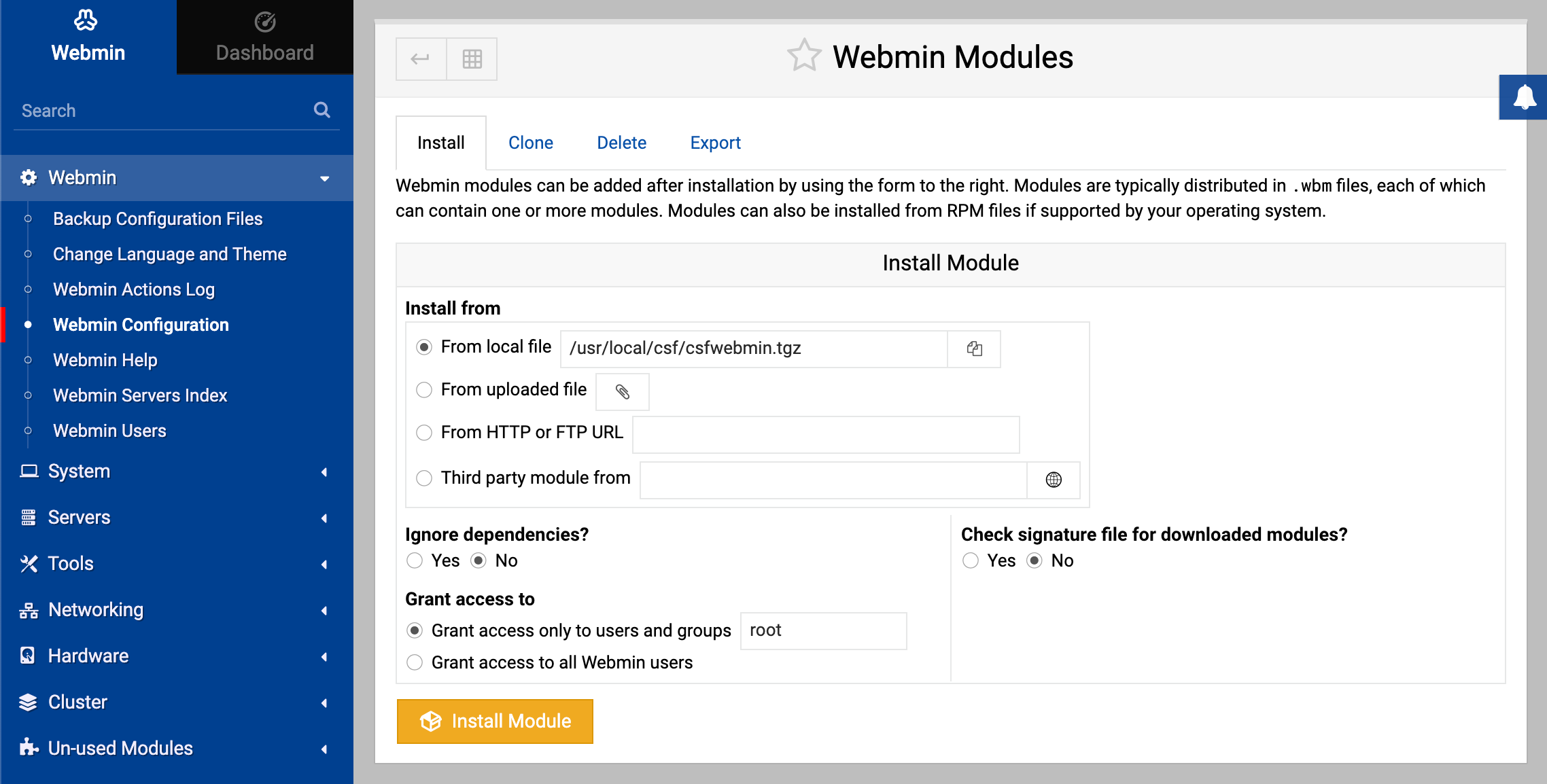
Current releases of the recommended fork install the Webmin integration automatically. If the CSF entry does not appear in Webmin, install the module manually:
- Navigate to Webmin ⇾ Webmin Configuration ⇾ Webmin Modules page.
- Select the From local file option.
- Choose
/usr/local/csf/csfwebmin.tgzfile. - Click Install Module as shown in the screenshot below.
Features
CSF combines firewall management with system and login monitoring. Its main features include:
- Straightforward SPI iptables and nftables firewall management
- Daemon process that checks for login authentication failures for:
- OpenSSH, Webmin
- Dovecot, Postfix, Proftpd
- Password protected web pages (htpasswd)
- mod_security failures (v1 and v2)
- Custom login failures with separate log file and regular expression matching
- POP3/IMAP login tracking to enforce logins per hour
- SSH login notification
- SU login notification
- Excessive connection blocking
- Outstanding Webmin UI integration
- Easy upgrade between versions from within the control panel
- Easy upgrade between versions from shell
- Auto-configures the SSH port if it’s non-standard on installation
- Block traffic on unused server IP addresses – helps reduce the risk to your server
- Alert when end-user scripts sending excessive emails per hour – for identifying spamming scripts
- Suspicious process reporting – reports potential exploits running on the server
- Excessive user processes reporting
- Excessive user process usage reporting and optional termination
- Suspicious file reporting – reports potential exploit files in
/tmpand similar directories - Directory and file watching – reports if a watched directory or a file changes
- Block traffic using block lists such as DShield and Spamhaus DROP
- BOGON packet protection
- Pre-configured settings for Low, Medium or High firewall security
- Works with multiple ethernet devices
- Server security check – performs a basic security and settings check on the server
- Allow Dynamic DNS IP addresses – always allow your IP address even if it changes whenever you connect to the internet
- Alert sent if server load average remains high for a specified length of time
- mod_security log reporting (if installed)
- IDS (Intrusion Detection System) – the last line of detection alerts you to changes to system and application binaries
- SYN flood protection
- Ping of death protection
- Port scan tracking and blocking
- Permanent and temporary (with TTL) IP blocking
- Exploit checks
- Account modification tracking – sends alerts if an account entry is modified, e.g. if the password is changed or the login shell
- Shared syslog aware
- Messenger service – allows you to redirect connection requests from blocked IP addresses to pre-configured text and HTML pages to inform the visitor that they have been blocked in the firewall. This can be particularly useful for those with a large user base and help process support requests more efficiently
- Country code blocking – allows you to deny or allow access by ISO Country Code
- Port flooding detection – per IP, per Port connection flooding detection and mitigation to help block DOS attacks
- lfd clustering – allows IP address blocks to be automatically propagated around a group of servers running lfd. It also supports cluster-wide allows, removals and configuration changes
- Quick start csf – deferred startup by lfd for servers with large block and/or allow lists
- Distributed login failure attack detection
- Temporary IP allows (with TTL)
- IPv6 support with ip6tables
- System statistics – basic graphs showing the performance of the server, e.g. Load Averages, CPU Usage, Memory Usage, etc
- ipset support for large IP lists
- Integration with the Cloudflare firewall
ConfigServer firewall (csf)
A comprehensive, straightforward, and flexible SPI firewall for iptables and nftables.
Login failure daemon (lfd)
A daemon that scans for login attempts against your server that continually fail within a short period of time, effectively blocking brute-force attacks.
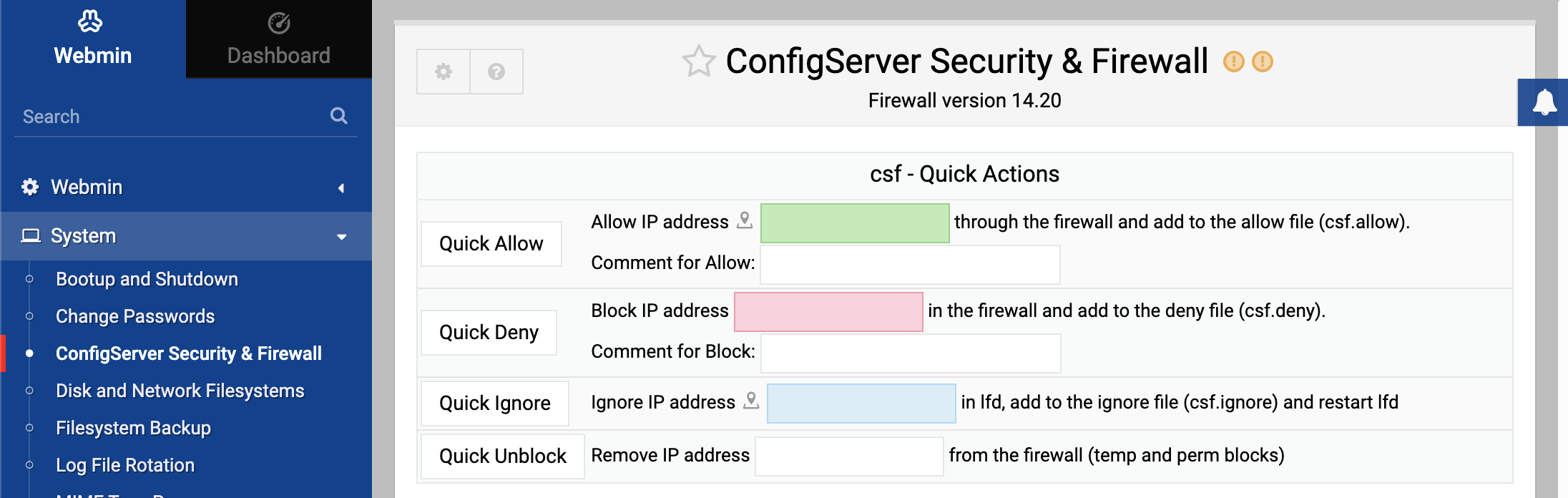
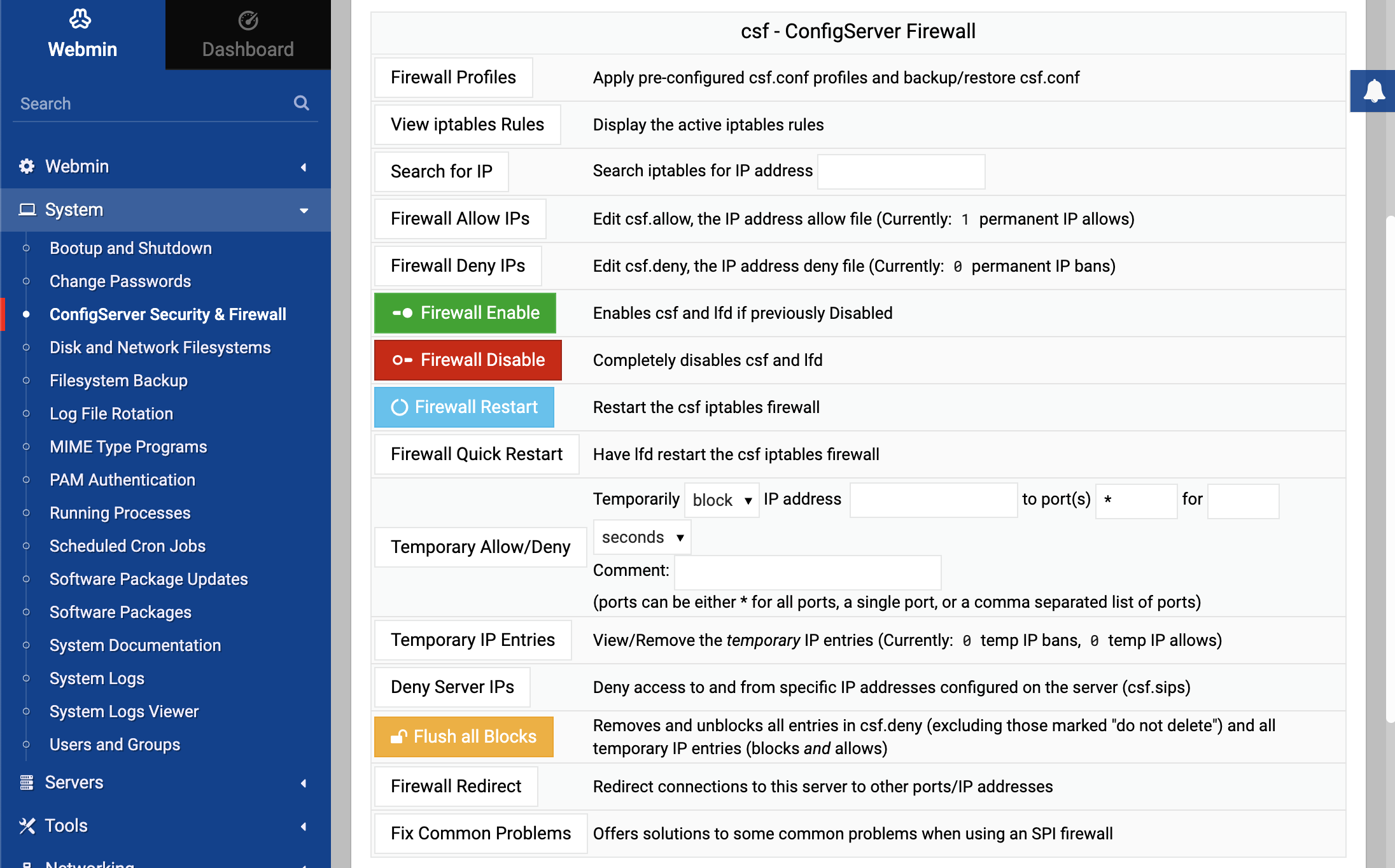
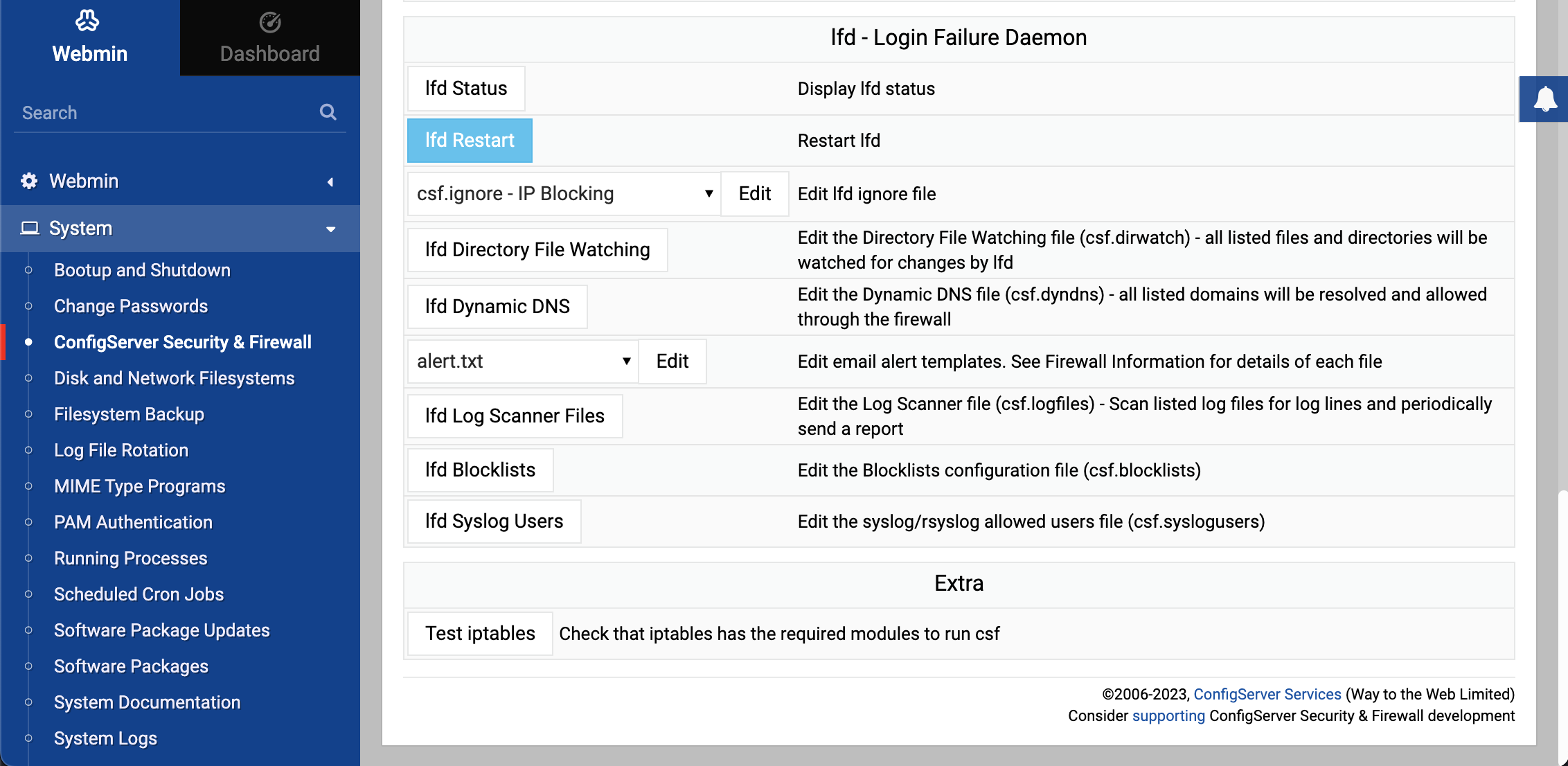
Screenshots
Support
For the recommended fork, use its GitHub issues and GitHub discussions. Webmin does not provide support for CSF itself.
Licensing
The original CSF 15.00 release and the recommended community fork are available under the GNU General Public License v3.0, without warranty.